The problem with the WatchGuard SSLVPN client is that it always downloads a fresh SSLVPN configuration file from the Firebox every time it connects. So if you change the SSLVPN settings on the Firebox — for example, from Full Tunnel to Split Tunnel — the next time the SSLVPN client connects, it will automatically download the new configuration and start using it.
One way to avoid this is:
- First configure Split Tunnel SSLVPN on the Firebox.
- Download and install the OpenVPN Community client.
- Download the Split Tunnel .ovpn file from the Firebox and import it into the OpenVPN client.
- After that, change the SSLVPN configuration on the Firebox from Split Tunnel back to Full Tunnel.
- Now install the WatchGuard SSLVPN client and connect normally.
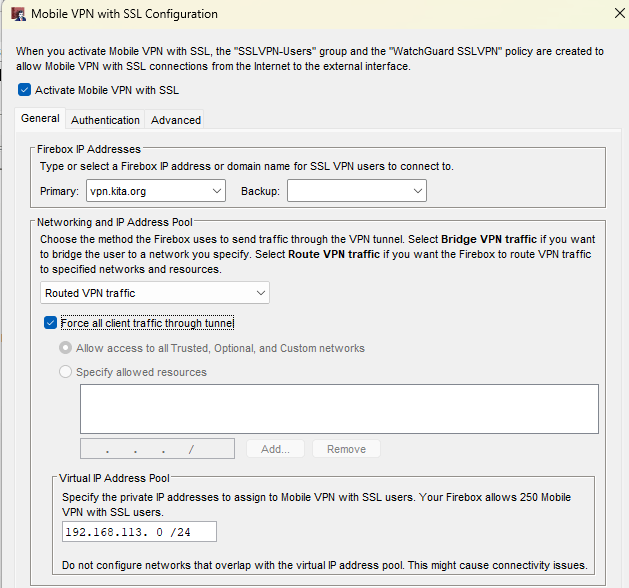
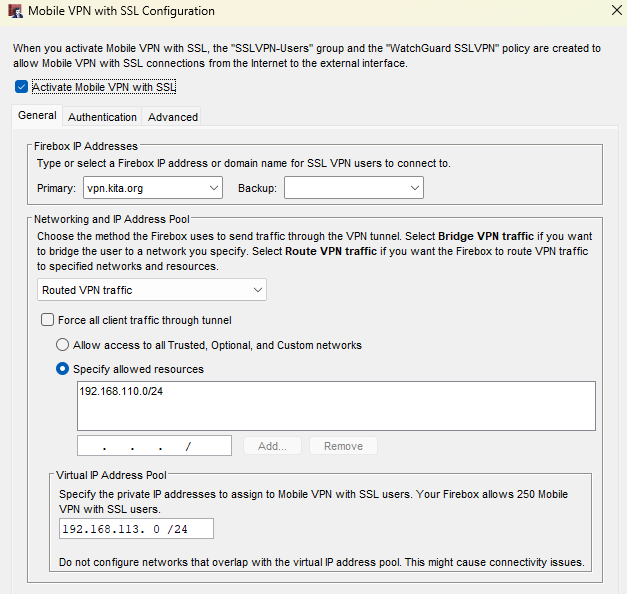
With this setup:
- WatchGuard SSLVPN clients will always use the Full Tunnel configuration (because they download the config automatically).
- OpenVPN clients will continue using the Split Tunnel configuration (because they use the static .ovpn file you imported).